

UiPath Communication Mining: Turning Business Communications into Automation Gold
Every enterprise has the same hidden problem: the most valuable signals about
Every enterprise has the same hidden problem: the most valuable signals about broken processes, customer frustration, and automation opportunities are locked inside the one place nobody is systematically analysing – business communications.
Emails, support tickets, chat messages, and service requests contain everything an organization needs to know about where work gets stuck, where customers are unhappy, and where automation would deliver immediate relief. But this data is unstructured, high-volume, and practically impossible to analyse manually at scale.
UiPath Communication Mining enterprise is the AI-powered platform that changes that – turning unstructured business communications into structured, actionable data using NLP and machine learning, without requiring any coding skills.

What Is UiPath Communication Mining?
UiPath Communication Mining is an AI-powered platform that analyzes unstructured business communications – emails, chat messages, and support tickets – to extract intent, sentiment, and actionable automation opportunities from the messages that flow through your organization every day.
How UiPath Communication Mining analyzes business emails and chats uses natural language processing to understand and categorize communications more accurately than manual review – at the scale that enterprise communication volumes demand. The result is structured, confidence-scored data extracted from unstructured messages – available via dashboard or API for direct input into automation decision-making.
How UiPath Communication Mining Processes Unstructured Messages
AI-powered communication mining for process discovery UiPath follows a seven-stage workflow from data ingestion to automated action:
Ingest communication data from live channels – Outlook, Salesforce, ServiceNow, Zendesk, Microsoft Teams, Slack – or from historical data via CSV or API upload. Communication Mining connects to the channels where your business conversations actually happen.
Unsupervised machine learning groups messages by similar topics, intents, and themes – without requiring predefined categories. This discovery phase exposes the actual patterns in your communication data: which request types are most frequent, which topics generate the highest volume, and where repetition is creating team overload.
Active learning enables users to annotate a small sample of messages – and Communication Mining uses those annotations to automatically classify the remainder. No data scientists required. Business analysts and operations teams can train domain-specific classification models using their contextual knowledge of what the messages mean.
Confidence-scored predictions are produced for every message – classifying intent, topic, urgency, and sentiment. Structured prediction data is made available through the Communication Mining dashboard or via API for downstream automation consumption.
Automated model performance validation identifies where classification accuracy is strong and where improvement is needed. Guided next-best-action recommendations help teams prioritize which model adjustments will deliver the greatest accuracy gains.
Custom dashboards and queries surface real-time insights into service quality, operational metrics, and risk signals – giving operations leaders visibility into communication patterns that were previously invisible inside individual inboxes and ticket queues.
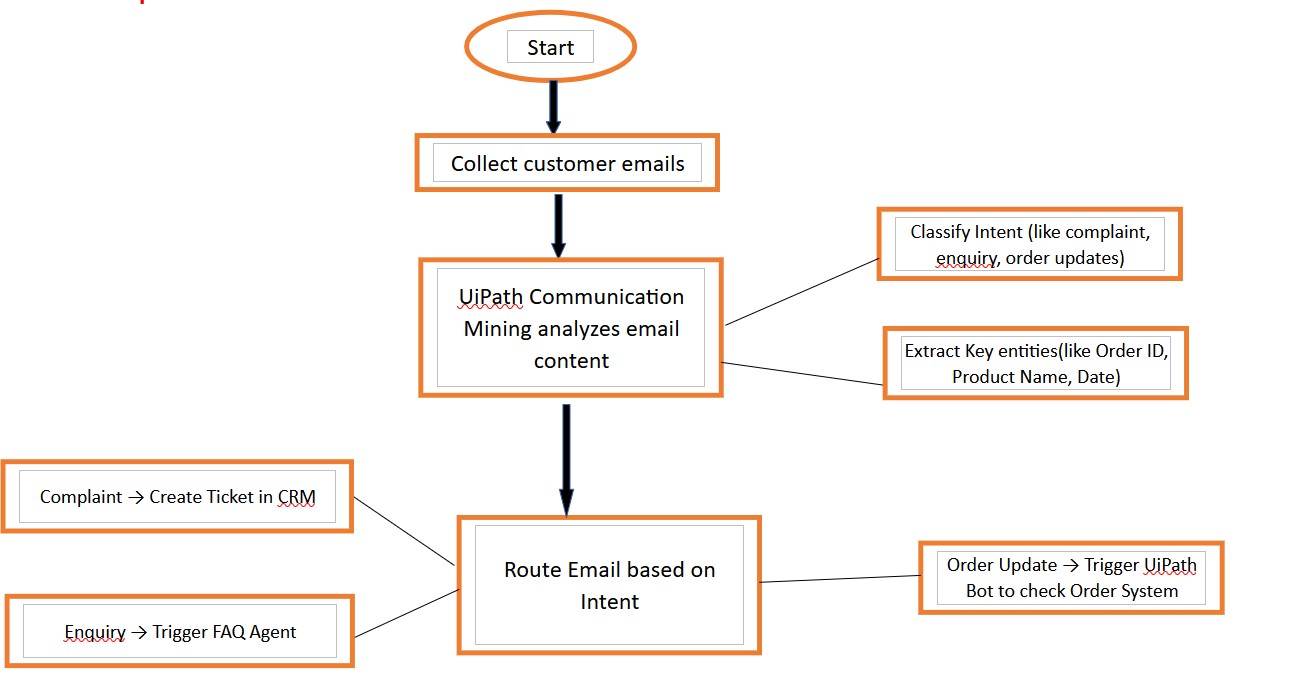
UiPath robots and AI agents use the structured predictions to automate downstream workflows – email triage (classification, prioritization, and routing), case creation, customer data updates, approval routing, and other service workflows that were previously triggered manually based on message reading.
Communication Mining vs Process Mining: What’s the Difference?
UiPath Communication Mining vs process mining comparison addresses a distinction that matters for how each capability fits into your automation discovery strategy:
| Dimension | Process Mining | Communication Mining |
|---|---|---|
| Data source | Structured event logs from enterprise systems (ERP, CRM, BPM) | Unstructured text from emails, tickets, chats, and messages |
| What it reveals | End-to-end process flows, deviations, and bottlenecks | Intent, sentiment, request patterns, and communication-driven process gaps |
| Analysis method | Event sequence analysis and conformance checking | NLP, machine learning classification, and sentiment analysis |
| Primary output | Process maps, cycle time analysis, conformance reports | Structured classification data, intent models, automation trigger signals |
| Best for | Understanding how structured transactional processes flow | Discovering what is happening in communication-driven workflows |
| Automation input | Identifies which processes to automate | Identifies which communication triggers should initiate automations |
Enterprise Use Cases: Customer Service, Finance, and HR
Customer service teams receive thousands of emails across product lines, regions, and request types. Communication Mining classifies every incoming message by intent and urgency – routing it to the correct team, creating the service case in CRM, and triggering acknowledgment communications automatically. Support agents handle exceptions and complex cases instead of spending the majority of their time reading and sorting incoming mail.
Finance teams receive supplier queries, invoice dispute notifications, payment confirmation requests, and escalation emails – all mixed in shared inboxes. Communication Mining classifies each message by type and urgency, routes disputes to the AP exception queue, triggers acknowledgment communications, and feeds structured data to AP automation workflows – compressing the inbox-to-action cycle from days to minutes.
HR inboxes receive a constant mix of policy questions, leave requests, benefits queries, payroll issues, and onboarding requests. Communication Mining classifies each query by category and intent – routing it to the appropriate HR function, triggering automated responses for standard queries, and escalating non-standard requests to the relevant HR team member with classification context attached.
IT support channels receive incident reports, change requests, access requests, and general queries – often with insufficient detail for accurate manual triage. Communication Mining classifies intent, extracts key technical details, assigns preliminary priority, and routes each communication to the correct support queue – reducing misroutes, improving first-assignment accuracy, and surfacing patterns in recurring issues before they become systemic problems.
Procurement teams managing large supplier bases receive performance notifications, delivery delay alerts, contract queries, and exception communications across high volumes of supplier messages. Communication Mining surfaces delay patterns, flags high-risk supplier communications by urgency, and routes exception messages to the relevant buyer – before delays cascade into supply chain disruptions.
From Communication Insights to Automation Triggers
Automating insights from business communications with UiPath is where Communication Mining moves from an analytics platform to an active automation enabler:
Communication Mining surfaces which message categories appear most frequently – these are the first automation candidates. A category representing 30% of all incoming customer service emails with consistent, predictable intent is a straight-through automation opportunity.
Average handling time per message category identifies where manual processing is most expensive. Categories with high volume and high handling time represent the highest ROI automation targets.
Once Communication Mining is classifying messages with high confidence, the structured output – intent category, sentiment score, extracted entities – becomes the trigger data for UiPath automations:
• Intent: Invoice Query + Entity: Invoice Number → trigger AP lookup and auto-response
• Intent: Leave Request + Entity: Employee ID + Date Range → trigger HR leave workflow
• Intent: Escalation + Sentiment: Negative + Priority: High → trigger immediate human routing with customer history
UiPath robots and AI agents consume the structured classification data via API – initiating the appropriate downstream workflow for each classified message. What was a manual inbox-reading and routing exercise becomes a fully automated, confidence-scored, and auditable process.
Automation outcomes feed back into Communication Mining model improvement – cases where automated routing was incorrect inform model retraining, improving classification accuracy over time. The automation and the classification model improve together.
Implementing UiPath Communication Mining with Rapidflow
Rapidflow deploys Communication Mining, connects it to your communication channels, configures AI models for your domain, and translates insights into concrete automation roadmap items.
Our UiPath Communication Mining implementation approach covers:
- Communication channel audit — mapping which inboxes, ticket queues, and chat channels contain the highest-value unstructured data for automation discovery
- Communication Mining platform deployment and channel connection — Outlook, Salesforce, ServiceNow, Zendesk, Microsoft Teams, Slack, or CSV/API historical data ingestion
- Discovery phase facilitation — reviewing unsupervised ML topic clusters with your subject matter experts to define classification categories aligned to your domain
- Model training — guiding annotation of representative message samples and configuring active learning for automated classification
- Confidence threshold configuration — defining the accuracy level at which classifications are used to trigger automations versus routed for human review
- Dashboard and analytics configuration — custom views aligned to your operational metrics and reporting requirements
- Automation integration design — translating Communication Mining classification outputs into UiPath automation triggers across your target workflows
- UiPath robot and AI agent workflow development for top-priority communication-driven automations
- GDPR and data governance setup — anonymization configuration, data retention policies, and privacy controls aligned to your compliance requirements
- Model performance monitoring and retraining schedule — ensuring classification accuracy improves over time as communication patterns evolve
Frequently Asked Questions
What is UiPath Communication Mining?
How does Communication Mining differ from Process Mining in UiPath?
What types of communications can UiPath Communication Mining analyze?
What business outcomes does Communication Mining enable?
Is UiPath Communication Mining GDPR compliant?
How does Rapidflow implement UiPath Communication Mining?