



UiPath AI Agent Terminology: A Complete Glossary of Key Concepts and Terms
The language of agentic AI is evolving fast – and for enterprise teams evaluating, building, or deploying UiPath AI agents, understanding the terminology is the foundation of every good implementation decision.
This complete guide to UiPath AI agent terminology covers every key term – from the basics of what an agent is, through LLM and memory concepts, to multi- agent coordination and orchestration – in plain language with practical context.

Why Understanding UiPath Agent Terminology Matters
Key terms in UiPath agentic automation glossary matter practically, not just academically. When a business stakeholder asks whether a workflow needs a single agent or a multi-agent team, when an architect is deciding between prompt engineering and fine-tuning for a UiPath agent context, or when an IT team is evaluating escalation threshold design – the answer depends on shared understanding of what these terms actually mean and how they relate to each other.
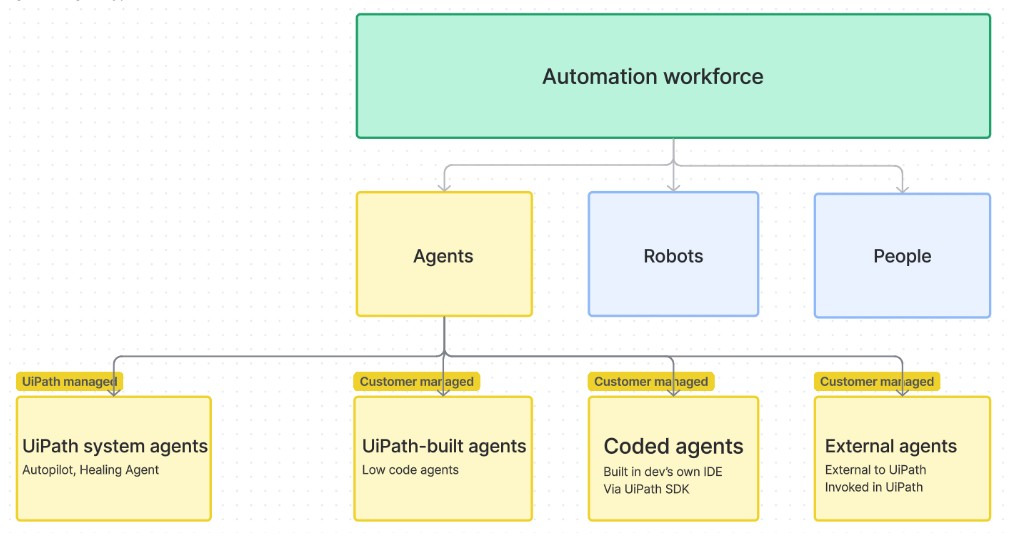
Core UiPath Agent Terms: Agent, Orchestrator, Tools, and Actions
- AI Agent: In UiPath, an AI agent is an autonomous software entity that understands natural language instructions, uses tools, accesses data, and executes multi-step tasks without hard-coded rules or step-by-step scripting. Unlike traditional RPA bots, AI agents determine how to achieve a goal rather than following a predefined sequence. Example: You say “Download the latest invoice from the portal and email it to finance.” The UiPath AI Agent opens the browser, logs into the portal, finds the latest invoice, downloads it, opens Outlook, and emails it to the finance team – without coding or manual instruction for each step.
- Agent Builder: UiPath Agent Builder is a low-code development environment for creating and deploying AI agents. It enables teams to build intelligent automation without deep coding expertise – accelerating agent development through visual configuration of goals, tools, contexts, and escalation rules.
- Agentic AI: Agentic AI is AI that goes beyond task execution to encompass autonomous decision-making, goal-oriented planning, experience-based adaptation, and dynamic response to changing conditions. It can collaborate with humans and other AI agents to manage complex workflows – behaving like a capable, autonomous digital worker rather than a rule-following script.
- Agentic Automation: When Agentic AI is applied to business processes, it becomes Agentic Automation – workflows that adjust automatically to changes, handle complex decision-driven tasks, and operate intelligently without requiring human intervention at every step. Agentic Automation extends the scope of what can be automated beyond the structured, predictable processes that traditional RPA addresses.
- UiPath Orchestrator: UiPath Orchestrator is the centralized platform that manages, schedules, monitors, and deploys both traditional RPA bots and AI agents across an enterprise environment. For agentic deployments, Orchestrator provides the governance layer – controlling which agents run, when they run, what resources they access, and how their outputs are logged.
- Tool (in UiPath agents): A tool in UiPath agents refers to an external capability the agent can invoke to complete a task – web search, database queries, REST API calls, file operations, code execution, or integration with external applications. Tools extend the agent’s reach beyond its internal reasoning capability to live systems and external data sources.
- Action: An action is a specific operation an agent performs – sending an email, updating a record, querying a database, triggering a downstream workflow. Actions are the outputs of agent reasoning – what the agent actually does in the world based on its understanding of the goal and the available tools.
- Agent Team: An Agent Team is the top-level container or workspace in Oracle AI and UiPath environments that groups together one or more related AI agents. Teams can contain a single agent or multiple coordinated specialist agents – managed by a supervisor in multi-agent configurations.
LLM-Related Terms in UiPath Agentic Automation
- LLM (Large Language Model): The AI model at the core of UiPath agentic automation that enables natural language understanding, reasoning, and generation. LLMs interpret user instructions, determine which tools to invoke, construct parameters for API calls, and generate human-readable responses. UiPath supports integration with multiple LLMs – GPT, Claude, LLaMA, and others – depending on deployment requirements.
- System Prompt: The system prompt is the foundational instruction set given to the LLM that defines the agent’s persona, scope, behavior boundaries, and operational rules. It tells the agent what it is, what it is allowed to do, how it should communicate, and what topics or actions fall outside its defined scope.
- User Prompt: The user prompt is the natural language input provided by the end user at runtime – the question, request, or instruction that the agent processes to determine its response and actions.
- Context Window: The context window is the maximum amount of text – system prompt, conversation history, retrieved documents, and current query – that the LLM can process in a single interaction. Managing context window size is important for complex agentic workflows where conversation history and retrieved content can accumulate across multiple turns.
- Prompt Engineering: The practice of crafting system and user prompts to guide LLM behavior without modifying the model’s underlying weights. Effective prompt engineering defines clear agent boundaries, provides behavioral examples, and reduces the likelihood of off-scope responses or hallucinations.
- RAG (Retrieval-Augmented Generation): An architecture that enhances LLM responses by retrieving relevant documents or data from a knowledge base before generating the answer – grounding the agent’s response in actual enterprise content rather than the model’s training data alone. RAG is commonly used in UiPath agents configured with document tools or knowledge base connections.
- Hallucination: An AI hallucination occurs when an LLM generates a confident but incorrect or fabricated response. In agentic contexts, hallucinations can cause agents to invoke tools with incorrect parameters, generate inaccurate summaries, or take actions based on invented information. Guardrails, RAG, and well-engineered prompts reduce hallucination risk.
- Token: The unit of text that LLMs process. Tokens are roughly equivalent to word fragments – a word like “automation” might be one or two tokens. Token count determines LLM usage cost and context window consumption – important considerations for high-volume agentic deployments.
Context, Memory, and Escalation: UiPath Agent Concepts
- Context: Context is the accumulated information available to the agent at any point in a workflow – the original instruction, conversation history, retrieved documents, tool outputs, and current state. Maintaining accurate context across multi-step agentic workflows is critical for coherent, consistent agent behavior.
- Agent Memory: Agent memory allows UiPath AI agents to retain context across multiple turns in a conversation or across sessions – enabling more coherent, context-aware automation. Without memory, each agent interaction starts from scratch. With memory, the agent recalls prior exchanges, decisions, and user preferences – delivering a more intelligent, continuous experience.
- Session Memory: Memory that persists within a single conversation or workflow session – enabling the agent to reference earlier exchanges within the same interaction without requiring the user to repeat context.
- Long-Term Memory: Memory that persists across multiple sessions – enabling agents to remember user preferences, prior decisions, and historical context from previous interactions. Long-term memory transforms one-off agent interactions into ongoing, relationship-aware assistance.
- Escalation: Escalation is when an AI agent encounters a situation it cannot handle autonomously – a low-confidence decision, an out-of-scope request, an exception requiring human judgment – and routes the task to a human for review, decision, or completion. In UiPath, escalation is managed through UiPath Action Center.
- Human-in-the-Loop (HITL): A design pattern where human review or approval is required at defined decision points within an agentic workflow – ensuring appropriate oversight for high-stakes or low-confidence agent decisions. HITL is not a fallback for failure; it is a governance design choice for specific categories of decisions that should always involve human judgment.
- Confidence Threshold: The minimum confidence level at which an agent will proceed autonomously versus escalating to a human reviewer. Configuring appropriate confidence thresholds is a key aspect of responsible agentic automation design – balancing autonomous efficiency against human oversight where genuinely needed.
- UiPath Action Center: The UiPath interface through which human reviewers receive escalated tasks from AI agents – complete with the context, data, and agent reasoning that informed the escalation. Action Center enables efficient human-in-the-loop workflows without requiring reviewers to reconstruct the situation from scratch.
- Guardrails: Configurable controls that constrain agent behavior – preventing out-of-scope actions, filtering inappropriate outputs, enforcing data access boundaries, and ensuring agents operate within defined policy parameters. Guardrails are the governance layer of responsible agentic automation.
UiPath Maestro and Multi-Agent Coordination Terms
- UiPath Maestro: UiPath Maestro is the orchestration layer for multi-agent workflows in UiPath – coordinating how multiple AI agents collaborate on complex, distributed business processes. Maestro assigns tasks to specialist agents, monitors progress, manages inter-agent communication, and handles exception routing across the full multi-agent workflow.
- Supervisor Agent: In a multi-agent architecture, the supervisor agent receives user requests, classifies them, and routes them to the appropriate specialist agent. The supervisor is responsible for maintaining the coherence of the user experience – assembling specialist outputs into unified, contextually consistent responses.
- Specialist Agent: A specialist agent is configured for a specific domain or function within a multi-agent team – HR, Finance, Supply Chain, IT, or Customer Service. Each specialist has its own tools, topics, and knowledge base, enabling deep domain expertise without one agent trying to handle all functions.
- Agent Orchestration: The process of coordinating multiple AI agents within a workflow – managing task assignment, sequencing, context passing between agents, and exception handling. Effective orchestration is what transforms a collection of individual agents into a coherent, collaborative system.
- Inter-Agent Communication: The mechanism through which agents within a multi-agent team share information, pass context, and coordinate actions. Reliable inter-agent communication ensures that specialist agents receive the right context from the supervisor and that their outputs are correctly assembled into the final response.
- Task Delegation: The process by which a supervisor agent assigns specific sub-tasks to specialist agents based on request classification. Effective task delegation is the core function of the supervisor – and its accuracy directly determines the quality of the multi-agent system’s overall performance.
- Parallel Execution: A multi-agent capability where multiple specialist agents work simultaneously on different sub-tasks within a single workflow – reducing total processing time for complex, multi-domain requests compared to sequential single-agent processing.
Quick Reference Glossary: UiPath Agent Terms A-Z
Understanding UiPath AI agent terminology for beginners is clearest with a consolidated reference:
| Term | Definition |
|---|---|
| Action | A specific operation performed by an agent – sending, updating, querying, triggering |
| Action Center | UiPath interface for human review of escalated agentic tasks |
| Agent Builder | Low-code platform for creating and deploying UiPath AI agents |
| Agent Memory | Retention of context across conversation turns or sessions |
| Agent Team | Container grouping one or more related AI agents |
| Agentic AI | AI capable of autonomous decision-making, planning, and adaptation |
| Agentic Automation | Application of agentic AI to dynamic, decision-driven business processes |
| AI Agent | Autonomous software entity that understands goals and executes multi-step tasks |
| Confidence Threshold | Minimum confidence level for autonomous agent action versus escalation |
| Context | Accumulated information available to the agent at any workflow point |
| Context Window | Maximum text the LLM can process in one interaction |
| Escalation | Agent routing of out-of-scope or low-confidence tasks to human review |
| Guardrails | Controls constraining agent behavior within defined policy parameters |
| Hallucination | LLM generating confident but incorrect or fabricated information |
| HITL | Human-in-the-Loop – human review required at defined decision points |
| Inter-Agent Communication | Information and context sharing between agents in a multi-agent team |
| LLM | Large Language Model – AI model powering natural language understanding |
| Long-Term Memory | Context retained across multiple agent sessions |
| Maestro | UiPath orchestration layer for multi-agent workflow coordination |
| Orchestrator | UiPath platform managing deployment, scheduling, and monitoring of agents |
| Parallel Execution | Multiple agents working simultaneously on different sub-tasks |
| Prompt Engineering | Crafting prompts to guide LLM behavior without model retraining |
| RAG | Retrieval-Augmented Generation – grounding AI responses in retrieved documents |
| Session Memory | Context retained within a single conversation session |
| Specialist Agent | Domain-specific agent within a multi-agent team |
| Supervisor Agent | Routing agent that classifies requests and delegates to specialist agents |
| System Prompt | Foundational instruction defining agent persona, scope, and behavior |
| Task Delegation | Supervisor assignment of sub-tasks to specialist agents |
| Token | Unit of text processed by LLM – determines cost and context window usage |
| Tool | External capability invoked by an agent – APIs, search, databases, files |
| User Prompt | End-user natural language instruction processed by the agent |
Rapidflow’s UiPath Agent Implementation Expertise
Rapidflow provides UiPath implementation services across the full agentic automation stack – from single agent deployments to complex multi-agent architectures coordinated by UiPath Maestro.